
A reproducible DNS snapshot comparison
Download the baseline and current example zone files. They use reserved example.com names and documentation-only TEST-NET addresses, not real organization data. Open the browser-local workspace, import one file on each side, set scope to example.com, then select Analyze snapshots.
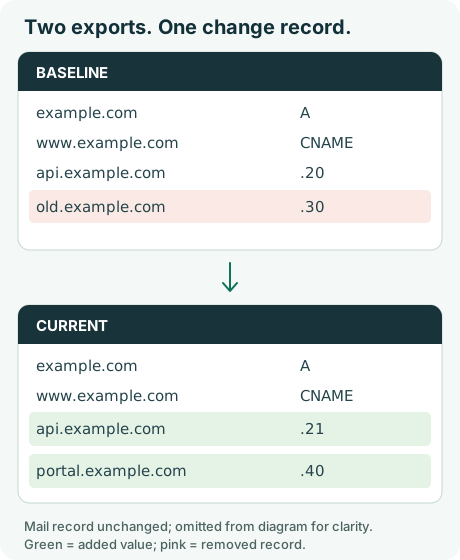
The diagram summarizes differences in supplied zone exports, not observed internet exposure.
Baseline export
$ORIGIN example.com.
$TTL 300
@ IN A 192.0.2.10
www IN CNAME example.com.
api IN A 192.0.2.20
old IN A 192.0.2.30
mail IN MX 10 mail.example.com.
Current export
$ORIGIN example.com.
$TTL 300
@ IN A 192.0.2.10
www IN CNAME example.com.
api IN A 192.0.2.21
portal IN A 192.0.2.40
mail IN MX 10 mail.example.com.
What should the tool report?
The two snapshots each contain five normalized hostnames. The current snapshot adds portal.example.com and no longer includes old.example.com. api.example.com stays present, but its A-record value changes.
| Reported item | Why it appears | Sensible next check |
|---|---|---|
Added host: portal.example.com | Current export contains it; baseline does not | Verify service purpose and owner |
Removed host: old.example.com | Baseline contains it; current export does not | Confirm approved retirement and dependencies |
Removed A: api.example.com → 192.0.2.20 | Previous configured value is absent | Confirm the planned address change |
Added A: api.example.com → 192.0.2.21 | Current configured value is new | Compare against approved DNS change records |
www and mail | Same normalized evidence in both inputs | No change in the compared fields |
The results are one added host, one removed host and four record additions/removals: portal added, old removed, and the previous and current api values. Host and record counts overlap intentionally; adding them together would overstate the number of distinct issues.
Why a changed record isn't automatically a security issue
An A-record replacement may accompany an authorized hosting migration. A missing row may result from a different DNS view or incomplete export. An added hostname does not establish live reachability or malicious intent. The workspace does not look up services, verify account ownership or label vulnerabilities.
When working with actual data, retain original exports, the collection times and any import warnings. Confirm consequential differences against authoritative configuration and change records. Use the asset-change review checklist to track the verification decision.
The comparison also ignores TTL and provider-comment differences. See the methodology for exact normalization rules and limits.